
I often find myself reconstructing a trip by looking back through the unedited pictures. It could be stuff like random shots out the window of a moving car or gas stations, stuff that wouldn’t make an album or blog post, but they help refresh the memories of the trip and recreate it in my mind. And now that we’re using our GPS to navigate, the track logs it automatically stores are a great way to get an overview of the route. So why not have the best of both worlds? Use the GPS tracks to geotag the photos and be able to see all the memories exactly where they happened on the route.
Saturday, September 18, 2010
Converting GPS Tracks to Routes to view in Google Maps
For the ADVODNA GPS Track Viewer to display tracks recorded by our GPS (a Zumo 660) or for them to be be viewed in any other Google Maps-based app, tracks need to be converted to routes. The Google API only understands Routes, not Tracks. To do this, I use a very handy little program called GPSBabel.
Settings:
Input File: 2010-04-15 Baja Tracks.gpx
Format: GPX XML
Filters –> Miscellaneous –> Transform: Tracks –> Routes: Check “delete” (removes tracks from converted file)
Filters –> Routes & Tracks –> Simplify: Limit to 1000 Points (note: each point seems to be about 1kb of resulting file size)
Output File: 2010-04-15 Baja Converted Routes.gpx
Format: GPX XML
Converted file looks like this:

Saturday, July 10, 2010
GPS Tracks: Nice, Gorge du Verdon, Pyrenees, Vercours Massif and Route des Grande Alpes Loop
After 10 days of riding and over 1500 miles, we’ve completed a great loop of southern France on a rented BMW F800GS motorcycle. Check out the full trip report at http://www.advodna.com/search/label/France or click below to view GPS tracks on a map or download them.
Tuesday, May 11, 2010
ADVODNA GPS Track Viewer
We’ve already established that I’m a little geeky. I think taking way too many pictures and videos and recording GPS tracks is fun and I’ve found it very helpful in planning this trip when other people have done the same. With that in mind, I started looking the other day into how to display GPS information stored in .gpx files in Google Maps.
A Google search came up with several samples of people doing similar things and I settled on this one to blatantly steal. In my own defense, there were several others with a lot of the same code which leads me to believe they all cannibalized a Google Maps API sample somewhere. I set out to build my own hybrid that did exactly what I wanted.

Monday, April 26, 2010
GPS Tracks: San Francisco to Bahia Los Angeles, Baja California and back
10 days on the road down to Baja and back. Mostly on the main roads and only as far south as Bahia Los Angeles. Click below to view or download the complete tracks in the ADVODNA GPS Track Viewer.
Splotter? Twot? Spacebook? Spottus Updates?
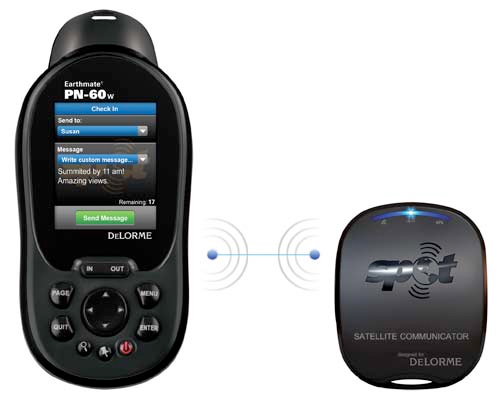
Some new news on the GPS front. Apparently, DeLorme and SPOT have announced a partnership that will allow freeform 48 character text messages to be sent wirelessly from a new DeLorme GPS device, the PN-60w, to a new SPOT device called a Satellite Communicator and then relayed through the GlobalStar satellite network. Assuming these messages could be delivered as emails, it would be easy to use them to update social networking accounts like Twitter or Facebook or to make blog posts. The new devices are scheduled for release in May 2010.
Info from http://www.trailspace.com/articles/2010/01/07/send-text-messages-from-almost-anywhere-on-earth.html
Sunday, January 24, 2010
I will not stop for directions in Timbuktu
No, that’s not true, local info is always gonna be the best for road conditions and I’m sure will provide some of our more “colorful” interactions, but I took some time the other day to look into GPS maps. We have a Garmin Zumo 660 that I bought for our Colorado Transamerica Trail trip in the summer of 2009 and figure it’ll be a great device for navigating us and tracking our progress on this adventure.
First stop to look for maps was Garmin where I found that they can only really take us one step south of the border with a detailed map of Mexico. After that, we would need to rely on their World Map which I imagine would get us between major cities, but is likely not more detailed than that.
